S_Merge 1.5
Updated on 17 May 2012
By Anthony Buckner
By Anthony Buckner
Specifications
License:
Shareware (Free to try)
Updated:
Downloads:
1984
Platform:
Windows (All Versions)
Publisher:
Venning Graphic(more)
Website:
User Reviews:
Other versions:
1.3
Do you like
S_Merge?
S_Merge?
FindMySoft Editor's Review
S_Merge – Image Blending Program
If you want to take some pictures and make a collage out of them, you can do so with the S_Merge application. This is an image blending program that will take the images (or the text) you feed into it and help you merge them together. You can create a good looking collage with images side by side or one on top of another.
To get started with S_Merge you will first have to download a 3.2MB executable. To install the application on Xp, Vista, or Windows 7, just run the executable and follow the instructions presented by the setup wizard. It will not take long to complete the process.
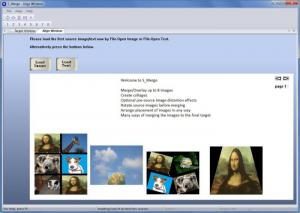
The interface puts a handy tutorial smack in the middle. The 7-step “Welcome to S_Merge” introduction tells you what the application is and what it can do. Above, there are big buttons from loading images or text, to the left there buttons for the 8 images you could feed into S_Merge, and in the upper left hand corner there’s the traditional File Menu.
To create a collage using S_Merge you need only start loading images into the application – you can do that by clicking the “Load Image” button from the upper left hand corner. As already mentioned, you can load up to 8 images. You can also load text; that text will be included in the collage. To switch between images you can click the numbers from the left hand side, the tabs above the “Load Image” button, or you can right click on the image. You can drag and drop the images as you see fit, or you can use the options from the Align menu. To get a preview of what you’ve achieved, go to the Target Window tab and click “Load Target.”
With S_Merge you can create a collage with the images next to one another, one on top of another, or blended one into another. You can move the images around, skew and distort them, make them transparent, and you can add text on top of them.
Speaking about text, the trial version of S_Merge will put a watermark on the output.
Easily create collages and blend images together with the S_Merge application.
Pros
Takes very little time to download and install S_Merge on a Windows PC (XP, Vista, and Windows 7 are supported). There’s a handy introduction that explains what S_Merge is and what it can be used for. Use S_Merge to create collages, blend images and text together.
Cons
Trial puts a watermark on the output.
To get started with S_Merge you will first have to download a 3.2MB executable. To install the application on Xp, Vista, or Windows 7, just run the executable and follow the instructions presented by the setup wizard. It will not take long to complete the process.
The interface puts a handy tutorial smack in the middle. The 7-step “Welcome to S_Merge” introduction tells you what the application is and what it can do. Above, there are big buttons from loading images or text, to the left there buttons for the 8 images you could feed into S_Merge, and in the upper left hand corner there’s the traditional File Menu.
To create a collage using S_Merge you need only start loading images into the application – you can do that by clicking the “Load Image” button from the upper left hand corner. As already mentioned, you can load up to 8 images. You can also load text; that text will be included in the collage. To switch between images you can click the numbers from the left hand side, the tabs above the “Load Image” button, or you can right click on the image. You can drag and drop the images as you see fit, or you can use the options from the Align menu. To get a preview of what you’ve achieved, go to the Target Window tab and click “Load Target.”
With S_Merge you can create a collage with the images next to one another, one on top of another, or blended one into another. You can move the images around, skew and distort them, make them transparent, and you can add text on top of them.
Speaking about text, the trial version of S_Merge will put a watermark on the output.
Easily create collages and blend images together with the S_Merge application.
Pros
Takes very little time to download and install S_Merge on a Windows PC (XP, Vista, and Windows 7 are supported). There’s a handy introduction that explains what S_Merge is and what it can be used for. Use S_Merge to create collages, blend images and text together.
Cons
Trial puts a watermark on the output.
System Requirements
100MHZ pentium minimum
Do you like S_Merge
Quick Look VideoNew
Popular News
The soon to be released Samsung Galaxy S3 is shaping up to be an event bigger commercial success than its predecessor, the Samsung Galaxy S2
Linux fans once again have the chance to take part in the annual Linux Foundation T-Shirt Design Contest, now in its 3rd edition
S_Merge Awards
S_Merge Editor's Review Rating
S_Merge has been reviewed by George Norman on
17 May 2012. Based on the user interface, features and complexity, Findmysoft has rated
S_Merge
4
out of 5 stars, naming it ExcellentYour Rating
Top Downloads
2.
Opera5.
Trillian8.
AIM9.
Skype10.
Ad-Aware12.
Nero13.
Google Earth14.
Picasa15.
Winamp16.
iTunes17.
RealPlayer18.
uTorrent19.
eMule20.
WinRAR21.
BitComet22.
WinZip23.
Shareaza24.
CCleaner25.
Recuva26.
Tweak UI27.
CuteFTP Home29.
Adobe Reader30.
NewsPiperBecome A Fan!
Link To Us!
S_Merge
HTML Linking Code
HTML Linking Code
Latest Reviews



